
Backdrop
Fill your screen with color
Download

Some Mac utilities feel like they should have shipped with the OS. Backdrop is one of them — a single, perfectly blank window that fills your screen (or every screen) with a solid color or image, and gets out of your way.
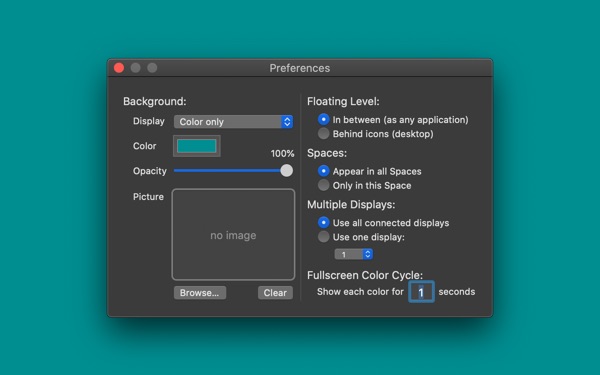
Use it for screen recordings and webinars where a chaotic desktop would distract. Use it as a clean stage for screenshots, app demos, and web design mockups. Use it for presentations, focus sessions, or color testing across displays. Multi-monitor support, a Fullscreen Color Cycle mode for calibration, and that's it. No ads. No in-app purchases. Free.
From the App Store
If there was any justice in this world this functionality would be built into the OS… Absolutely essential for screen recording.
— @dr.Peterson, App Store, 2024
Hello Old Friend! I've been using it for over a dozen years… Sometimes the simple apps are the ones I appreciate the most.
— @Ekwoman, App Store, 2023
Does exactly what it says it does. Works well. Doesn't crash. Doesn't have crap like ads or in-app purchases. Thank you!
— @Madrobby, App Store, 2020
The epitome of "one thing well."
— @antititus, App Store, 2026
So helpful it should be built into macOS. I use it at least a couple times a week for screenshots or screensharing.
— @100 Watt Walrus, App Store, 2026
What's new in 3.2
Native Apple Silicon, still free, still one window. 4 Mouse Rating from Macworld.
Screenshots
Recent Updates
Apple Silicon
Native on Apple Silicon. Same Backdrop, now running at full speed on every Mac. A larger update is in progress.
Settings Restored
Settings for Space selection and transparency options restored. Added picture fitting and filling options.
64-bit and Dark Mode
Updated to 64-bit. Dark mode support added.
Privacy
The developer does not collect any data from this app.